
You have a media monitoring platform, a keyword set you’ve tailored more than once, and thresholds you’ve already adjusted after the last false-positive week.
And you still found out about a broadcast hit because someone forwarded you the clip.
That isn’t a configuration problem, which is why tightening the config never fixes it. Online news, wires, and social are text-native and match instantly. TV, radio, and podcasts arrive as audio, and audio has to be transcribed before a keyword can hit it. The delay lives in the pipeline, upstream of anything you control in the interface.
So the question isn’t whether you’re monitoring. It’s how many minutes sit between air and alert, and whether anyone has ever told you the number.
Key Takeaways:
- A real-time alert fires within seconds or minutes of air or publication. Not on a schedule.
- Broadcast latency is an infrastructure property, not a settings problem. You can’t tune your way past it.
- Ask where a platform’s TV and radio data comes from. Capture and licensing are not the same speed.
- Use a metric, not a vibe: five minutes from air, with a clip attached so your team can respond quickly.
- Crisis monitoring is layered — first mention, spike, sentiment, escalation. Most platforms only sell layer one.
What Are Real-Time Media Monitoring Alerts, and What Do They Track?
Real-time media alerts fire the second a keyword, brand, or topic hits a monitored channel. No digest, no schedule, no waiting for a scan.
Speed is the entire product. A segment airs at 6:02 a.m. and is already moving across major social media platforms, like TikTok and X, by noon. An 8 a.m. digest burns a third of the window before you open it and emerging stories rarely wait for your email inbox.
What a real system covers:
- Broadcast television, live and recorded
- AM/FM and satellite radio
- Podcast audio, matched against transcripts
- Online news and wires
- Social amplification of broadcast clips
That range of media, from broadcast, podcasts, and online conversations, is what separates a true monitoring platform from a single-channel monitoring tool.
Capture vs. Licensing
This is the part nobody volunteers in a renewal conversation. Many monitoring vendors license broadcast data from a third party rather than capturing streams directly. It’s a rational build-versus-buy call, and it’s invisible on a feature list. But each handoff between capture, transcription, and delivery adds time you never see itemized.
Worth asking directly: do you capture the stream, or license the feed? What’s the delay introduced by that step? The hesitation is usually more informative than the answer.
Coverage and Alerting are Different Products
A daily or hourly roundup is a reporting instrument. It’s the right tool for share-of-voice, campaign measurement, and the board deck. It is the wrong tool at 6:04 a.m. Most contracts price the two together, which makes it easy to have excellent coverage and slow alerting at the same time and no line item that reveals it.
What a Broadcast-Capable Alert Setup Requires
Four things, and this is a useful audit against what you already own: native ingestion of live TV and radio streams rather than clips uploaded after the fact; podcast transcription with keyword indexing; thresholds configurable by channel, so one mention and forty don’t route identically; and delivery into the channel your team actually lives in. SMS, push, or a webhook into Slack. An hourly email in your inbox is a report, not an alert. If you’re evaluating platforms on this, a media monitoring platform built on direct broadcast capture is the only category that clears all four.
Worth a note for anyone still supplementing with Google Alerts: it crawls indexed web pages, not social platforms or social content. No broadcast transcripts, no live radio, no podcast audio. A cable segment surfaces if and when a reporter writes it up and Google indexes it. For a ninety-second hit that never becomes an article, that’s never.
The Broadcast and Podcast Speed Problem
Print sits still. It builds over days, and you can stay on top of it.
Broadcast media doesn’t sit anywhere. The clip outlives the segment and travels faster than the outlet that aired it, so the response window collapses into minutes.
The pipeline: live audio in, speech-to-text, keyword match, clip generated, alert out. Every step costs seconds. A vendor with a ten-minute transcription lag calling that real-time is selling a word.
Nobody in this category talks about content half-life, meaning the window between air time and peak amplification. They talk about coverage volume and industry trends, because volume looks good on a slide. Half-life is what decides whether you get to make a statement or an apology.
What “Real-Time” Should Actually Mean
Everyone says real-time. Almost nobody says how many minutes. So hold every vendor to a number, ours included:
Five minutes from broadcast air. Two minutes from online publication. Inside the podcast’s active distribution window. Clip or transcript attached, so your team can act faster without logging into a second dashboard.
Three settings decide whether you hit it.
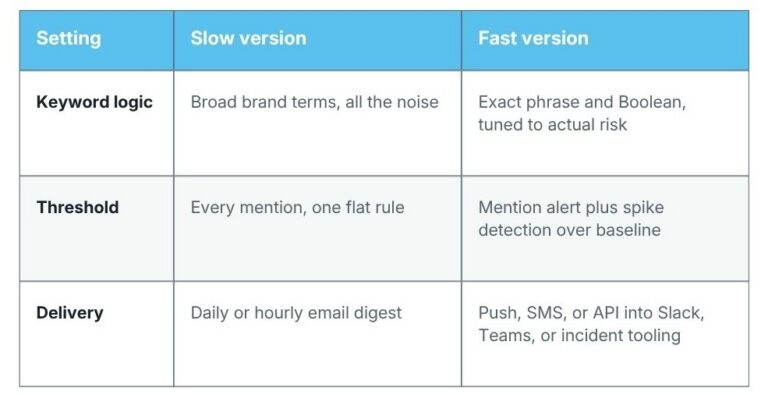
How Real-Time Broadcast Alerts Support Crisis Detection
Speed isn’t the point. Control is. Once a story has run twice on cable, been clipped, and picked up by a second outlet, the narrative is set and your statement is a footnote to it.
A crisis-grade setup runs four layers, not one:
- First mention. Fires on the initial keyword match, any channel. Is this happening?
- Volume spike. Fires when mention frequency clears a threshold in a rolling window. Is it growing?
- Sentiment shift. Fires when negative sentiment crosses a set share of mentions. Is it turning?
- Escalation. Routes to leadership, spokespeople, and other internal stakeholders when broadcast reach or amplification passes a line. Who needs to be in the room?
Layer one is standard. Layers two through four depend on whether the platform exposes rolling-window thresholds and routing rules, and most don’t. That kind of cross-team coordination is what enterprise media monitoring solutions are built to handle at scale.
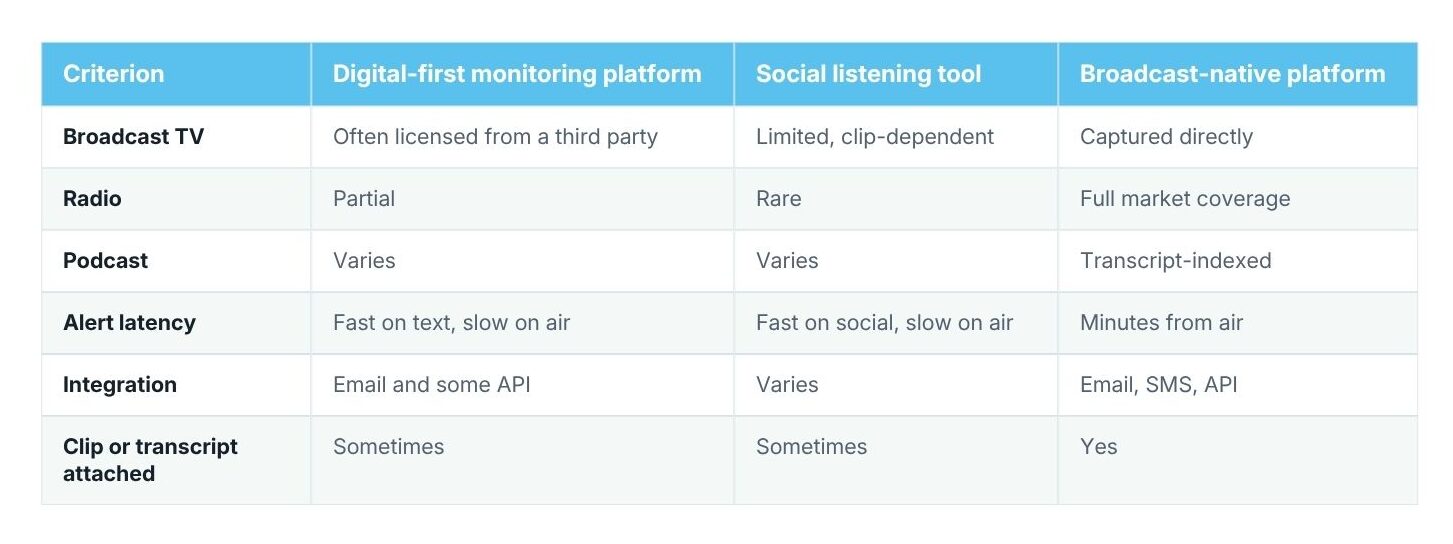
Evaluating Alert Tools: Look Past “Coverage”
Switching or renewing your media monitoring tools, the questions are the same. Feature checklists reward breadth of media coverage. Crises punish lag.
- Broadcast infrastructure. Capture the stream, or license the feed? Each handoff is delay you’re paying for.
- Transcription. Average time from air to searchable transcript, and word-error rate on accents and crosstalk. If they can’t answer, that’s the answer.
- Podcast depth. How many feeds, and how long from episode publish to matched alert?
- Customization. Thresholds set independently by channel, keyword, geography, and time of day, or one rule for everything?
- Integration. API into Slack, Teams, or PagerDuty, or email only?
Where to Start with Real-Time Media Alerts
Before you evaluate anything, get your own number.
Take three segments you know aired — one TV, one radio, one podcast. Find the air timestamp, then find when your platform surfaced it. The delta is your real alert latency. Vendors quote averages across their whole footprint; you need yours, in your markets, at your dayparts.
Then the question that actually matters. Would your alerts have caught your last broadcast mention before a colleague forwarded you the clip or before it impacted your brand reputation?
If not, it isn’t because you’re under-monitored. It’s because the tool was built for text and asked to cover air. Learn more about our media monitoring services today.